
Halo Help Centre
View your Halo model below to see helpful guides, troubleshooting advice
and answers to our frequently asked questions.
Contact details can be found at the bottom of this page.
Track Your Order
Enter your order number and billing postcode below to check the latest status of your order.






General Enquiries
I need a delivery update
All customer are sent an ‘Order Complete’ email once your order is packed and has passed to our courier. This includes a tracking link.
Please check you junk email in case your confirmation email has gone there.
At busy times it can take up to 3 working days for your order to dispatch, though this is normally faster. Your ‘Order Complete’ email will only be sent once the order has passed to our appointed courier.
My Halo is Cutting out
Check the bag is empty and filters clean. Blockages will cause the motor temperature to rise and cut out for it’s own protection.
Check for blockages through the Floorhead, tube and bag.
On models with removable batteries, remove and reattach the battery to ensure it is well secured.
Ensure the battery is fully charged.
Motorised Brush bar is not spinning
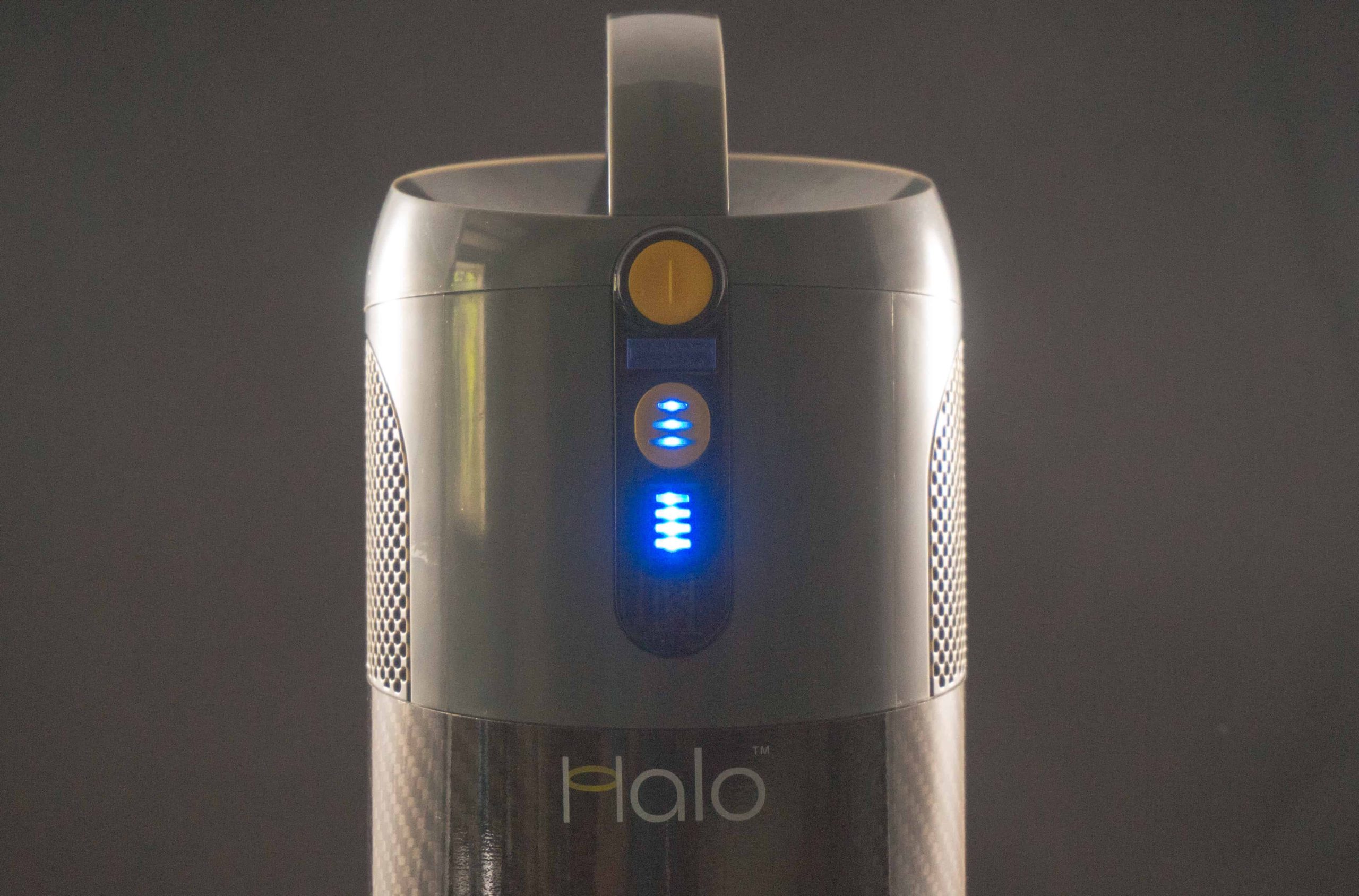
1. Ensure the rectangular switch on the control panel (the middle of the 3) is pressed AFTER the main power button is switched on.
2. Ensure there are no blockages in or around the brushbar – first remove the Motor Brush head from the tube or main unit, the brush bar can be removed from the motor brush head to check this.
3. Disconnect the Motor Brush Head from the vacuum. Check if the brush can be rotated by hand. With care the motor brush head can be run with the brush bar removed to check if the motor is seized. If the Motor Brush Head runs with the brush removed then this would suggest an issue with the brush.
4. The Motor Brush Head can be connected directly to the main unit (removing the tube) to check if there is any power issue with the tube. Once the Motor Brush Head is connected to the main unit, press the rectangular switch on the control panel (the middle of the 3), ensuring it is pressed AFTER the main power button is switched on.
Floor tool light turns orange/red
1. Please remove the brushes and ensure there is nothing tangled around them.
2. Inspect the floor tool case and piping while the brushes are extracted for any blockages inside that area.
3. Power up the floor tool without the brushes inserted. Does this work?
3. Reinsert the brushes, ensuring they click back in fully.
4. Try powering up the floor tool once more – does this work now?
Bag Full Indicator
The full pouch light is intended as an indicator, but we always also recommend a visual check. Depending on type of debris collected, whether any areas are clogged, or whether the pouch has air pockets amongst the debris, the sensor may not always pick up the full contents.
It is best to do a visual check every now and again if you feel the pouch hasn’t been emptied in a while or your Halo seems hot when running or is cutting out.
My Halo is not cleaning well
1. Change the Dust Pouch
2. Check for blockages
3. Remove hair from the Motor Brush Head
My Halo won’t switch on?
1. Charge the Battery for at least 3 hours
2. Change the Dust Pouch and check for blockages
3. Let Capsule X cool for 30 minutes and try again
Dirt is falling back out of the Motor Brush head
1. Change the Dust Pouch
2. Check for blockages
Motor Brush Head not working?
1. Remove the brushes. ensure there is nothing tangled around them
2. Inspect the floor tool case and piping for any blockages or damage
3. Power up the floor tool without the brushes inserted and check for function
4. Reinsert the brushes, ensuring they click back in fully
Battery not lasting
1. Leave the charger connected for at least 3 hours
2. Check the correct Halo charger is being used. (can we add image)
The runtimes of the Halo Capsule are advised below:
Normal/Eco 60 minutes +
Performance 25-30 minutes
Boost 8-10 minutes
Results all vary slightly depending on the floor surface and if batteries have been completely charged. Deep pile carpets, a full bag or even a cold battery will impact run time. Storing it out of cold environments can also help prolong battery life, as well as ensuring that it is charged for a minimum of 3 hours with our Halo provided charger.
Please also remember you can use Eco mode too to assist battery life (press the power button 2 times and it will scroll to this mode)
Warranty information
Your new Capsule comes with a complementary guarantee.
Your proof of purchase acts as your registration document, please have this to hand if you ever need to contact Halo.
Warranty registration
What’s covered:
- If Capsule is used in the way it is intended and breaks down whilst being used for normal domestic cleaning within the guarantee period it’s our responsibility to repair or replace it.
What is NOT Covered under warranty:
- Accidental damage
Critical information to confirm before any repair, replacement or warranty issue conducted:
- Proof of purchase – your order number from when you bought your Halo is very helpful
- Current address
What is the 30 day No Quibble guarantee?
Halo offer a 30 day no quibble money back guarantee. Please contact Halo to arrange this.
What is your returns policy?
Halo honour a 30 day period to try at home and if the vacuum is not for you we will, upon return will provide a full refund Please see terms and conditions for full details on this.
Pre-orders can be cancelled at any time before shipment and receive a full refund.

Setting Up
How do I set up my Capsule?
Insert the Dust Pouch, attach your chosen accessory and fully charge the battery before first use.
How long does Capsule take to charge?
A full charge takes approximately 2–2.5 hours.
How do I attach accessories?
Push accessories directly onto the Extension Tube or Main Unit until securely connected.
Maintenance
How do I clean my Capsule?
Regularly replace the Dust Pouch, clear any blockages and remove hair from the brush roll.
How often should I change the Dust Pouch?
Replace the pouch when full or when suction performance drops.
Can I wash the filter?
Yes. Rinse under water and allow it to dry fully for 24 hours before refitting.
Technical Specification
How much does Capsule weigh?
The Original Capsule weighs just 2.6kg.
How long does the battery last?
- Eco Mode: Over 60 mins
- Performance Mode: Over 25 mins
- Boost Mode: Approx. 9 mins
Does Capsule use HEPA filtration?
Yes. Capsule uses advanced filtration to help trap dust and allergens.
Accessories
Which accessories are included with the Capsule Original?
Capsule includes a Power Brush Head, Crevice Tool, Combination Tool, Extension Tube and Dust Pouches.
What is the Mini Power Brush used for?
Ideal for upholstery, stairs, pet hair and stubborn dirt.
What is the Hard Floor Roller used for?
Designed for optimum cleaning on hard flooring while protecting delicate surfaces.
How to guide
How to change the tool attachment?
How do I change the Dust Pouch?
How do I remove hair from the brush roll?
FAQs
Why is my Capsule losing suction?
This is usually caused by a full Dust Pouch or blockage. Replace the pouch and check for obstructions.
Is Capsule suitable for pet hair?
What warranty does Capsule include?

Setting Up
How do I set up Capsule X?
Insert the battery until it clicks securely into place, fit the Dust Pouch and attach your chosen accessory before charging fully.
How long does Capsule X take to charge?
A full charge takes approximately 2–2.5 hours.
Can the battery be charged separately?
Yes. The removable battery can be charged while attached to Capsule X or separately for added convenience.
Maintenance
How do I clean Capsule X?
Regularly replace the Dust Pouch, clear any blockages and remove hair from the Motor Brush Head to maintain peak performance.
How often should I replace the Dust Pouch?
Replace the Dust Pouch when full or when suction performance drops.
Can I wash the filters?
The Dust Pouch Filter can be rinsed and dried fully for 24 hours before reuse. The Exhaust Filter is not washable and should be replaced every 2 years.
How do I remove hair from the brush roll?
Unlock the brush roll end cap, remove the brush and trim away any wrapped hair or debris before refitting.
Technical Specification
How much does Capsule X weigh?
Capsule X weighs just 2.6kg for lightweight whole-home cleaning.
How long does the battery last?
- Eco Mode: Over 60 mins
- Performance Mode: Over 25 mins
- Boost Mode: Approx. 9 mins
Does Capsule X use HEPA filtration?
Yes. Capsule X features advanced filtration designed to capture fine dust and allergens.
Does Capsule X have interchangeable batteries?
Yes. Additional batteries are available for extended runtime and uninterrupted cleaning.
Accessories
Which accessories are included?
Capsule X includes a Motor Brush Head, Crevice Tool, Combination Tool, Extension Tube, Battery and Dust Pouches.
What is the Mini Power Brush used for?
Perfect for upholstery, stairs, pet hair and stubborn dirt in smaller spaces.
What is the Hard Floor Roller used for?
Designed for optimum cleaning performance on hard flooring while helping protect delicate surfaces.
How to guide
How do I change the tool attachment?
How do I remove the battery?
How do I change the Dust Pouch?
FAQs
Why is Capsule X losing suction?
Is Capsule X suitable for pet hair?
What does the flashing red light mean?
What warranty does Capsule X include?

Setting Up
How do I set up Capsule XR?
Insert the battery, fit the Dust Pouch, attach your chosen accessory and fully charge before first use.
How long does Capsule XR take to charge?
Each battery fully charges in approximately 2.5 hours.
Can I swap batteries during cleaning?
Yes. Capsule XR uses interchangeable batteries for uninterrupted cleaning and extended runtime.
Maintenance
How do I clean Capsule XR?
Regularly replace the Dust Pouch, remove hair from the floor head and check for blockages to maintain peak performance.
How often should I replace the Dust Pouch?
Replace the pouch when full or when suction performance begins to reduce.
Does Capsule XR have washable filters?
Some filters can be cleaned depending on usage, but always ensure filters are fully dry before refitting.
How do I remove hair from the brush roll?
Remove the brush roll from the floor head and carefully trim away any wrapped hair or debris.
Technical Specification
How much does Capsule XR weigh?
Capsule XR weighs just 2.7kg for lightweight and effortless cleaning.
How long does the battery last?
Capsule XR delivers up to 70 minutes runtime per battery, or up to 140 minutes total runtime with dual batteries.
Does Capsule XR use HEPA filtration?
Yes. Capsule XR features premium H14 HEPA filtration designed to trap dust, allergens and odours.
Does Capsule XR have anti-hair technology?
Yes. The upgraded Anti-Hair floor head helps prevent hair tangling while maintaining powerful cleaning performance.
Accessories
Which accessories are included?
Capsule XR includes a Crevice Tool, Combination Tool, Motor Brush Head, Dust Pouches and charger, with additional accessories available depending on bundle type.
What is the Mini Power Brush used for?
Ideal for stairs, upholstery, pet hair and stubborn dirt in compact spaces.
What is the Hard Floor Roller used for?
Designed for superior cleaning on hard flooring while helping protect delicate surfaces.
How to guide
How do I change the tool attachment?
How do I change the Dust Pouch?
How do I swap the battery?
FAQs
Why is my Capsule XR losing suction?
Is Capsule XR suitable for pet hair?
Is Capsule XR suitable for allergy sufferers?

Setting Up
How do I set up HotSpot?
Fill the clean water tank, add Halo Power Spot detergent if desired and connect the hose and cleaning tool before switching on.
How much cleaning reach does HotSpot have?
HotSpot includes a 4m power cable and 1.75m hose for nearly 6m of total cleaning reach.
Can I use detergent with HotSpot?
Yes. HotSpot includes Halo Power Spot detergent specially formulated for optimum heated cleaning performance.
Maintenance
How do I clean HotSpot after use?
Empty the dirty water tank, rinse the tools and run the self-cleaning hose function to flush out dirt and debris.
Does HotSpot have a self-cleaning feature?
Yes. The hose includes a self-cleaning function to help keep the system clean after every use.
Can the cleaning tools be removed?
Yes. The hose and cleaning tools can be disassembled for deeper cleaning and maintenance.
Technical Specification
How powerful is Halo HotSpot?
HotSpot delivers 1700W of cleaning power, including a 1200W heater and 500W suction motor.
How hot does the water get?
HotSpot can heat water up to 60°C for effective stain removal and also includes a 100°C steam function.
How large are the water tanks?
HotSpot features:
- 1.6L clean water tank
- 1.0L dirty water tank
How much does HotSpot weigh?
Halo HotSpot weighs approximately 4.25kg.
Accessories
What is included with HotSpot?
- Heated washer unit
- 1.75m hose
- Cleaning tools
- Fabric bristle brush
- Hard surface rubber brush
- Halo Power Spot detergent
What is the fabric brush used for?
Ideal for upholstery, carpets, sofas, stairs and fabric surfaces.
What is the rubber brush used for?
Designed for hard surfaces and tougher cleaning tasks.
How to guide
How do I empty the dirty water tank?
How do I use the steam function?
How do I clean the hose?
FAQs
Can HotSpot remove tough stains?
Is HotSpot good for upholstery and sofas?
Does HotSpot dry surfaces completely?
What warranty does HotSpot include?
Do you still need some assistance?
Upgrade Your Cleaning Routine Today
Experience, powerful, lightweight cordless cleaning with Halo Capsule